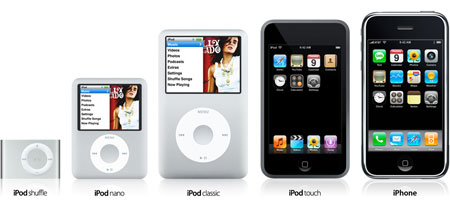
Apple have just announced, as many have predicted, the iPod Touch. Basically an iPhone without the phone. It comes in 8Gb and 16Gb flavours (which is far too small a capacity for me to even consider buying — I have enough trouble with 60Gb!) and has built-in wifi for browsing the web and spending your hard-earned cash at iTunes while you wait for your delayed train (or while at their new friend Starbucks’ place). Still, it looks cool.
Also announced:
- An all-metal 160Gb iPod classic
- A chubby new 8 or 16Gb iPod nano (with coverflow and video playback)
- iPod nano in new colours
- and a cheaper 8Gb iPhone (no 4Gb, it seems)
If you want more geekery, Engadget have a hands-on with both the iPod nano and iPod touch.
O2 ‘to get iPhone contract in UK’: Not so handy for me because I’m already on the O2 network and the best phone deals always seem to go to new customers. | Comments (0) »

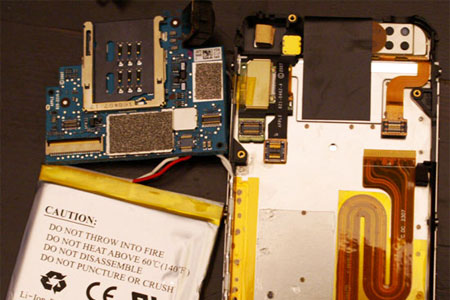
The iPhone Dissected. Literally. You’ve just got home with a $500 state-of-the-art* mobile phone. What’s the first thing you’re going to want to do? Rip it apart! (via Boing Boing)
*[If state-of-the-art means a phone that can't send MMS, use an MP3 for a ringtone or copy and paste text]
Update: I swear I’m not obsessed with destroying expensive gadgets! PCWorld scratch and drop-test the new Apple phone and stick the video on You Tube. Meanwhile, Daring Fireball has a thorough round-up of first impressions of the iPhone.

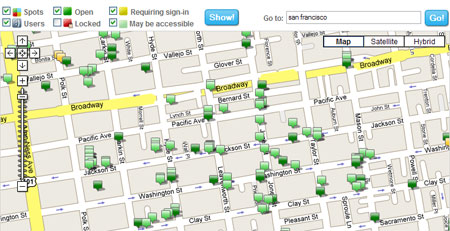
WeFi is a new collaborative wifi mapping tool that records open wifi networks that your computer can “see” and uploads them to a central database. Anyone can then browse their website for access points anywhere in the world and see them on a Google-powered map. The ultimate goal is to “make open Wi-Fi act more like a wireless infrastructure that can compete with 3G networks, except freely created and shared by the users.”
Wonderful idea, though their site seems to think I’m in Slough. (via Boing Boing)
I’ve just spent the morning trying to fix problems which should have been very easy to fix… but weren’t because I was simply looking in the wrong places for the answer!
Firstly, I attempted to collect my email. Thunderbird fired up fine, as usual, but just stopped at “Connecting to…” I thought the problem was my mail server but no, I could connect via IMAP and webmail just fine. Turns out the problem is Norton… again. Now, aside from being a hideous resource hog, Norton Internet Security is a lovely little app that runs in the background where you let it do its thing and forget about it. Of course, because it’s forgotten about it’s the absolute last place you (well, I, at least!) forget to look.
Secondly, I thought I’d have a play with OrangeTV, Orange’s new app (currently for the Nokia 6680) which streams “TV” to your UMTS/3G mobile. Now, I had a play with this a few days ago but couldn’t get any sound to accompany the video. Figuring it was just a network problem, and because I hadn’t used it before, I didn’t think too much of it.
This morning I gave it another go; again no sound.
When I first received this new handset I found the warning tones a little bit too loud for my liking and, as Nokia still don’t have the option of reducing the warning tone volume independently, I’d turned them off. Strangely, the developers of the OrangeTV app have chosen to disable the audio if the warning tone is turned off in the selected profile. Very odd.
Anyway, I’ve just wasted half a day sorting those out. Now I’ve wasted further time writing about it. :)